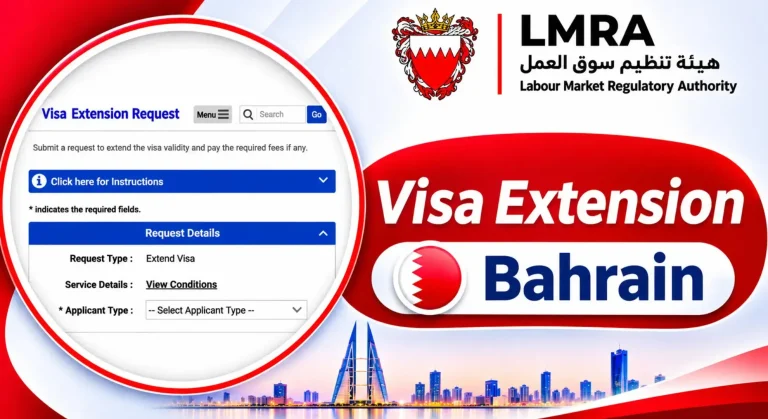
Expat Portal Check Visa 2027: LMRA Portal Status And Expiry Date
Expat Portal Check Visa 2027. If you are living or working in Bahrain and want to check your visa status, expiry date or work permit details, finding the right online service can be confusing. You may also want to know whether you can check your status using your CPR or passport number track an application, or view your family’s visa information. The good news is that Bahrain provides online services to find information.
The LMRA Expat Portal allows eligible expatriates workers to review their personal details, work permit status, expiry date and available dependent information. You can also use LMRA Express Services to support work permit enquiries while employers use EMS to manage relevant applications.
If you need to check a visitor’s visa, the NPRA eVisa Portal is the appropriate service for relevant enquiries. This guide explains how each service works, how to check your details and what to do if your visa information is missing or incorrect.
What Is the Expat Portal?
Living and working in Bahrain means keeping track of your work permit and visa details. If you are unsure whether your permit is active, when it expires, or where to check your information, the LMRA Expat Portal can help you find the relevant details online.
The Expat Portal is an online service provided by the Labour Market Regulatory Authority (LMRA). It allows eligible expatriate workers to review personal information, visa or work permit status, expiry dates, and certain dependant details without visiting an LMRA office for every enquiry.
What Information Can You Find on the Expat Portal?
The portal gives expatriate workers access to important information connected with their records. The information available can depend on the person’s status and the records held by LMRA. You may be able to review:
- Personal details registered with LMRA.
- Your work permit or visa status shown in the portal.
- Work permit or visa expiry date.
- Information about registered dependants, where available.
- Contact details, including your email address and mobile or telephone number.
- Other information connected with your expatriate record.
The portal is useful because it gives workers a way to review their records and identify details that may need attention. However, it should not be treated as a general checking service for every type of Bahrain visa.
Expat Portal Check Visa Online
The Bahrain Expat Portal provides an online way for eligible expatriates to review their records. It can save time because workers do not always need to visit an office just to check basic information.
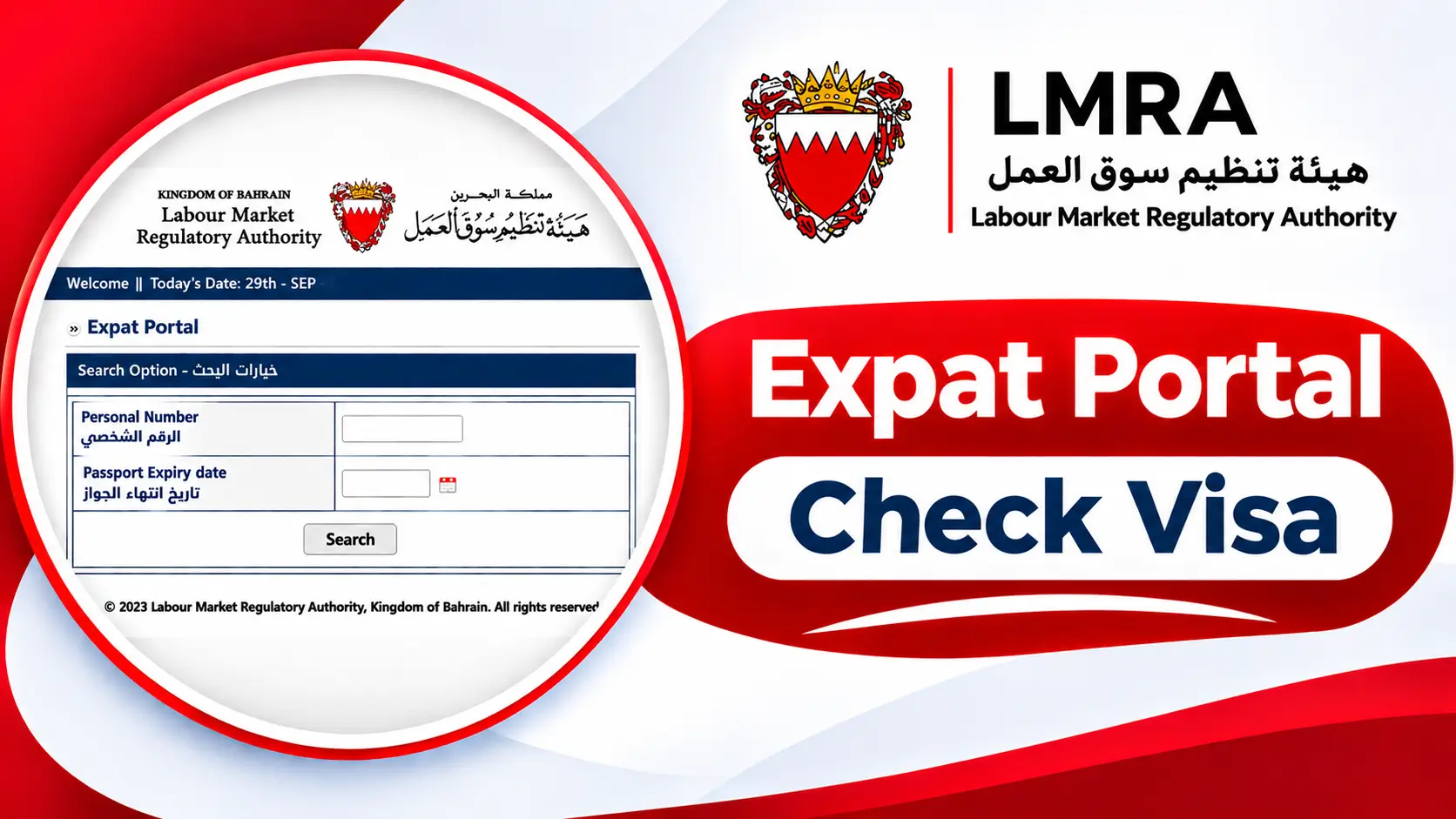
Before starting, make sure you have the details required for the portal login. The official LMRA guidance describes access using your CPR or personal number and passport expiry date.
What You Need Before Checking Your Visa
Prepare the correct information before opening the portal. Incorrect details can prevent you from accessing your record.
| Required detail | Why it is needed |
|---|---|
| CPR or personal number | Helps identify your expatriate record |
| Passport expiry date | Used as part of the official portal login process |
| Internet connection | Allows you to access the online service |
| Updated personal information | Helps you compare the displayed record with your documents |
Use the information exactly as it appears on your official documents. Do not enter another person’s CPR number or passport information to access their private record.
Steps to Check Your Visa Online
Follow these general steps to review your information through the LMRA Expat Portal:
- Open the official LMRA website.
- Find the Expat Portal service or its official access page.
- Enter your CPR or personal number.
- Provide your passport expiry date as requested.
- Submit the information to continue.
- Open the available personal or permit details.
- Review the status and expiry information shown in your record.
- Check that your personal details are correct.
- Save or note important information for future reference.
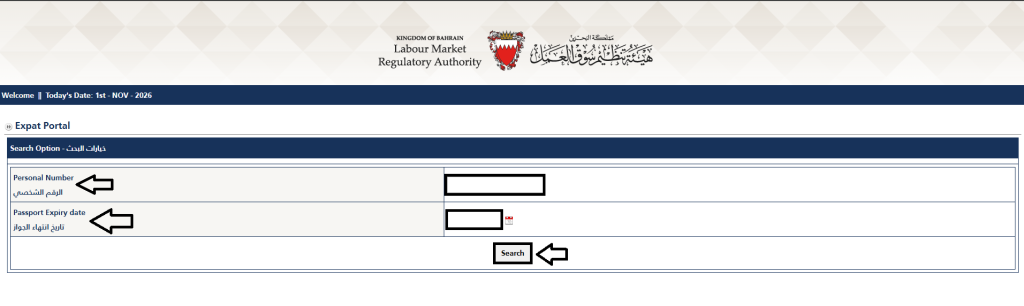
The exact screen layout may change when LMRA updates its online services. Always use the official website rather than an unknown third-party page that asks for personal information.
How To Access Your Expat Portal Account
To access your dashboard, start from the official LMRA website and select the relevant Expat Portal service. Enter the requested personal details carefully and follow the instructions displayed on the page. Keep these points in mind:
- Use your own CPR or personal number.
- Check your passport expiry date before entering it.
- Make sure there are no typing errors.
- Use a secure internet connection.
- Do not share your login details with unknown people.
- Avoid entering personal information on unofficial websites.
What If You Cannot Log In?
A login problem does not always mean that your work permit has expired. It may happen because of incorrect information, an outdated record, a technical issue, or a problem with the portal. Check the following before contacting LMRA:
- Confirm that your CPR or personal number is correct.
- Check the passport expiry date printed on your passport.
- Make sure you are using the official Expat Portal.
- Try again after checking your internet connection.
- If the problem continues, contact LMRA for help.
Do not repeatedly submit random details. If your information is correct but the system still does not recognise you, LMRA may need to guide you.
Review Your Visa Details
After accessing the portal, review the information carefully. Do not check only whether the status appears active. Your personal details and expiry date are also important. A small mistake in a name, passport detail, or contact number may cause problems when you need to complete another service.
How To Check My Visa on LMRA Expat Portal
If you are an expatriate employee and want to review your work-related record, the LMRA Expat Portal is a useful starting point. It gives eligible users access to personal information recorded in the LMRA system. The process is straightforward when you have the correct login details.
- Visit the official LMRA website.
- Open the Expat Portal service.
- Enter your CPR or personal number.
- Add your passport expiry date.
- Follow the instructions shown on the page.
- Access your available record.
- Review your visa or work permit status.
- Check the expiry date and personal details.
- Contact LMRA if the information appears incorrect.
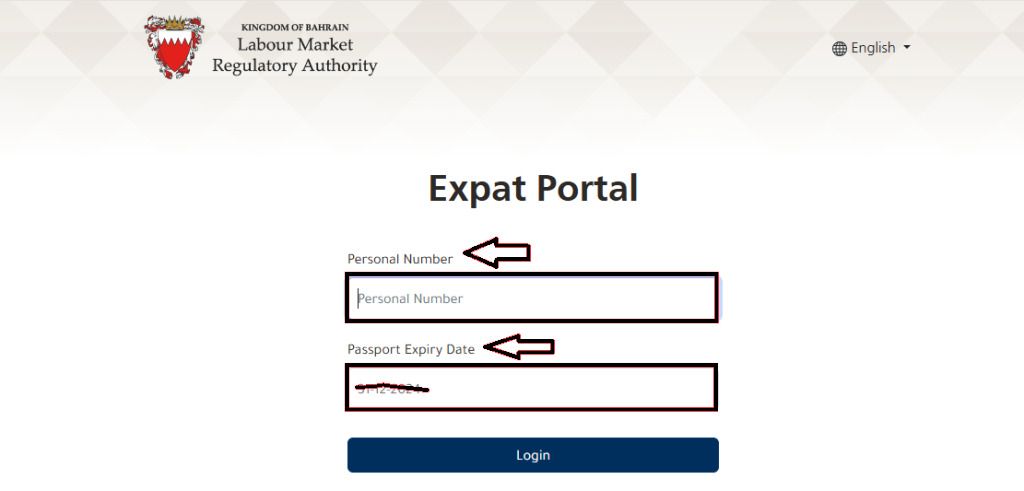
The portal’s displayed information should be treated as the record available through that service. If you need a formal confirmation for an employer, government application, or legal matter, ask the relevant authority for the appropriate document or confirmation.
What Should You Do After Checking?
Once you have reviewed your details, take action if something needs attention.
- If your permit is active, note its expiry date.
- If the expiry date is approaching, contact your employer about renewal.
- If your personal information is incorrect, ask LMRA how to correct it.
- If the status is unclear, contact the authority instead of relying on assumptions.
- If you are checking a visitor visa, use the NPRA eVisa service where applicable.
How To Track LMRA Visa Processing Time
A work permit application may pass through several stages before the final decision. The processing time can depend on the application type, employer’s documents, worker’s information, and any additional checks required by the authority.
The Expat Portal and LMRA Express Services can help users review available information, but they should not be treated as a promise that every application will receive a decision within a fixed number of days.
Ways to Follow Your Application
You can use the relevant LMRA service to check the information available for your application. Depending on the service, you may need one of the following:
- CPR or personal number.
- Work permit number.
- Application ID.
- Passport number.
- Other details requested by the selected service.
For employer-submitted applications, the employer or authorised representative may need to use the Expat Management System (EMS).
What Can Affect Processing Time?
Several issues may affect how quickly an application moves forward:
| Possible factor | How it can affect an application |
|---|---|
| Incomplete documents | The authority may need additional information |
| Incorrect personal details | Information may need checking or correction |
| Employer-related requirements | The employer may need to complete further steps |
| Application type | Different permit categories may follow different processes |
| Additional checks | Some applications may require further review |
| Technical problems | Online updates or access may be delayed |
If your application appears delayed, ask your employer or authorised representative to review its status. Contact LMRA when you need clarification about a specific application.
Why the Expat Portal Is Important
Expatriates need reliable information about their work-related status while living in Bahrain. An expired or incorrect permit record can create difficulties when dealing with employers and government services.
The Expat Portal helps workers review the information recorded by LMRA. It also gives them a way to notice errors and check important dates before taking further action.
Importance of Checking Visa Status Regularly
Checking your record regularly can help you avoid last-minute problems. It is especially useful when your work permit is approaching its expiry date or when your personal details have recently changed. Regular checks can help you:
- Keep track of your work permit expiry date.
- Notice changes in your available status information.
- Check whether your personal details are correct.
- Identify possible record errors.
- Discuss renewal with your employer in time.
- Review available dependant information.
- Understand when you may need to contact LMRA.
Do not wait until the last day to check your permit. If you notice an issue, give yourself enough time to contact the relevant authority and follow its instructions.
Benefits of Using the Expat Portal
The main benefit is access to relevant personal information through an online service. It can reduce the need for office visits when you only need to review details available in the portal. Other benefits include:
- Convenience: Review supported information online.
- Time saving: Avoid unnecessary visits for basic enquiries.
- Record checking: Compare the displayed information with your documents.
- Expiry awareness: Keep track of important permit dates.
- Contact updates: Update supported contact information when the service allows it.
- Dependant information: Review available details connected with eligible dependants.
The portal does not replace every LMRA or NPRA service. Some applications and official requests still require an employer, authorised representative, or direct contact with the relevant authority.
Who Can Use the Bahrain Expat Portal?
The service is mainly intended for expatriate workers whose information is recorded in the LMRA system. It is especially useful for foreign employees who want to review their work-related immigration information. It may be relevant to:
- Expatriate employees working for private-sector employers in Bahrain.
- Foreign workers who want to check their work permit details.
- Eligible workers who need to review their permit expiry date.
- Expatriates who want to confirm personal information recorded by LMRA.
- Workers who need to review available dependant information.
If you are checking a tourist or visitor visa, the NPRA eVisa service may be the correct option instead. The right service depends on the type of visa or permit you want to check.
LMRA Express Services For Work Permit Status Check
LMRA Express Services is separate from the personal Expat Portal. It provides supported electronic services and enquiries related to the labour market and work permits.
Depending on the selected service, a user may be asked to provide a personal number, work permit number, application ID, or passport number. The exact information required depends on the enquiry.
How to Use LMRA Express Services
- Open the official LMRA website.
- Find the Express Services section.
- Select the work permit enquiry that matches your needs.
- Enter the requested reference information.
- Provide any additional details requested by the service.
- Submit the enquiry.
- Review the result displayed by the system.
Do not confuse Express Services with the Expat Portal login. They are separate ways to access supported information.
When Should You Use Express Services?
This service may be useful when you need to check a supported work permit enquiry and the personal Expat Portal does not provide the information you need.
If you are checking a specific application, keep its application ID or work permit number available. For an employer-managed application, the employer may need to check it through EMS.
Expat Management System (EMS) for Employers
The Expat Management System (EMS) is an LMRA system used by employers and authorised representatives to manage relevant work permit services. It is different from the personal Expat Portal used by eligible expatriate workers. Employees should not expect to use an employer’s EMS account as their personal visa-checking login.
What Can Employers Do Through EMS?
Depending on their permissions and the services available, employers or authorised representatives may use EMS to manage work permit matters such as:
- Submitting relevant work permit applications.
- Managing supported employee permit records.
- Applying for eligible work permit renewals.
- Reviewing application information.
- Following employer-side work permit procedures.
The available services depend on the employer’s account, the worker’s category, and the relevant LMRA rules.
Can an Employee Use EMS to Check a Visa?
An employee normally needs to use the personal services available to them or ask their employer to check an employer-managed application. If you need information about your own work permit, start with the LMRA Expat Portal or the relevant Express Services enquiry. Contact LMRA if you cannot access the information you need.
What to Do If the Expat Portal Is Not Working or Running Slowly
A slow or unavailable portal can be frustrating, especially when you need to check an expiry date or confirm your work permit information. Before assuming that your record has a problem, check whether the issue is related to your device, browser, internet connection, or the website itself.
Simple Steps To Fix Portal Problems
Try these basic steps:
- Check whether your internet connection is working.
- Reload the official “LMRA” page.
- Open the service in another browser.
- Clear the browser cache if the page continues to show an error.
- Check that you are using the correct official service.
- Try again later if the website appears to be under maintenance.
- Contact LMRA if you still cannot access your record.
When Should You Contact LMRA?
Contact LMRA if the portal continues to reject correct information, your record is missing, or your displayed details do not match your documents.
Explain the problem clearly and provide only the information requested through official channels. Never send sensitive documents to an unknown person who offers to fix your portal account.
Key Features of the Expat Portal
The Expat Portal focuses on information that helps expatriate workers stay informed about their records. Its available features may depend on the user’s record and the services currently provided by LMRA.
Personal Details and Visa Information
Eligible users can review personal details held in the LMRA system. The portal can also show visa or work permit status and expiry information. This makes it easier to compare online records with personal documents and identify details that may need attention.
Dependant Information
The official LMRA expatriate guidance also refers to dependant details. If information about your dependants is available in your record, review it carefully. For a family member’s separate visitor visa or another immigration matter, the correct NPRA service may still be required.
Contact Information Updates
The portal guidance describes the ability to update contact details such as email addresses and mobile or telephone numbers. Keep your contact information current so that relevant communication can reach you. Follow the instructions displayed by LMRA when making any change.
Online Access to Expatriate Records
The portal gives eligible workers an online route to review supported information. It is designed to help expatriates stay informed without depending entirely on an employer for every basic record enquiry. However, it is not an employer management dashboard and does not provide every service available through LMRA other systems.
Common Issues While Checking Visa Status
Some expatriates face problems when opening the Expat Portal or reviewing their information. These issues can result from incorrect login details, technical errors, or differences between records. Understanding the possible cause can help you choose the right next step.
Incorrect CPR or Passport Details
A typing error in your CPR number or passport expiry date may stop the login process. Recheck the information against your official documents before trying again.
Do not use an old passport expiry date if you have renewed your passport. If your record has not been updated, ask the relevant authority how to correct it.
Visa Status Is Not Showing
If your visa status does not appear, it does not automatically mean that your permit is cancelled or expired. The issue may relate to the service you selected or the information available in the system.
Confirm that you are using the correct service for your permit type. If the record remains unavailable, contact LMRA or ask your employer to check the relevant work permit record.
Portal Is Not Opening
The website may sometimes be unavailable because of maintenance, a connection problem, or a temporary technical issue. Try these steps:
- Check your internet connection.
- Reload the official page.
- Open the website in another browser.
- Clear your browser cache if the page continues to load incorrectly.
- Try again later if the service appears temporarily unavailable.
- Contact LMRA if the issue continues.
Personal Information Is Incorrect
If your name, passport information, CPR details, or contact information does not match your documents, do not ignore the difference. Ask LMRA about the correct process for updating the record. Your employer may also need to assist if the issue is connected with a work permit application.
Tips For Expats Using the Expat Portal
A few simple habits can make it easier to manage your Bahrain work permit information. Keep your official documents safe and check your records whenever an important detail changes.
Keep Your Documents Updated
Make sure your passport and personal information are current. If you renew your passport, ask the relevant authority or your employer whether the new details need to be updated in the LMRA record.
Check Your Expiry Date Early
Do not wait until your work permit is about to expire. Speak with your employer about the renewal process and confirm which steps apply to your permit category.
Use Official Websites
Use the official LMRA website for work permit and expatriate worker information. Use the NPRA eVisa website for relevant visitor visa services. Avoid websites that promise instant visa approval or ask you to share sensitive information without a clear official purpose.
Keep Your Login Details Private
Your CPR and passport information are personal details. Do not share them with unknown websites, social media accounts, or people claiming they can check your visa for a fee.
LMRA Contact Details and Support
If you cannot check your permit information online, LMRA can guide you about its services and the correct process for your enquiry. The following contact details have been published for LMRA. Check the official website before relying on them, as contact channels may change.
| Contact method | Details |
|---|---|
| Authority | Labour Market Regulatory Authority (LMRA) |
| Telephone | +973 17506055 |
| [email protected] | |
| Official website | https://www.lmra.gov.bh/ |
When contacting LMRA, explain whether you are checking a personal Expat Portal record, a work permit application, or an employer-managed service. For general government service guidance, Bahrain’s National Contact Center has also published the number 8000 8001. Confirm the current contact details through the official Bahrain government portal.
NPRA Contact for Immigration Enquiries
If your question concerns a visitor visa or an immigration service handled by NPRA, contact NPRA rather than relying on LMRA for an answer. NPRA contact information previously published includes:
| Contact method | Details |
|---|---|
| Authority | Nationality, Passports and Residence Affairs (NPRA) |
| Telephone | +973 17077077 |
| Official website | https://www.npra.gov.bh/ |
Confirm the current contact details on the official NPRA website before calling or sending an enquiry.
FAQs About Bahrain Expat Portal Visa Check
Conclusion
The Bahrain Expat Portal is a useful online service for expatriate workers who need to review their personal information, work permit status, expiry date, and available dependant details. Using the correct CPR or personal number and passport expiry date can help eligible users access their records. It is also important to understand the difference between the LMRA Expat Portal, LMRA Express Services, EMS, and NPRA eVisa. Use LMRA services for relevant work permit matters and NPRA services for the visitor visa and immigration enquiries they handle. If your information is missing, incorrect, or unclear, contact the responsible authority rather than relying on assumptions or outdated third-party instructions.