Bahrain ID Card Photo Requirements 2026: A Complete CPR Photo Size, Background Color, Rejection Reasons And Face Rules Guide
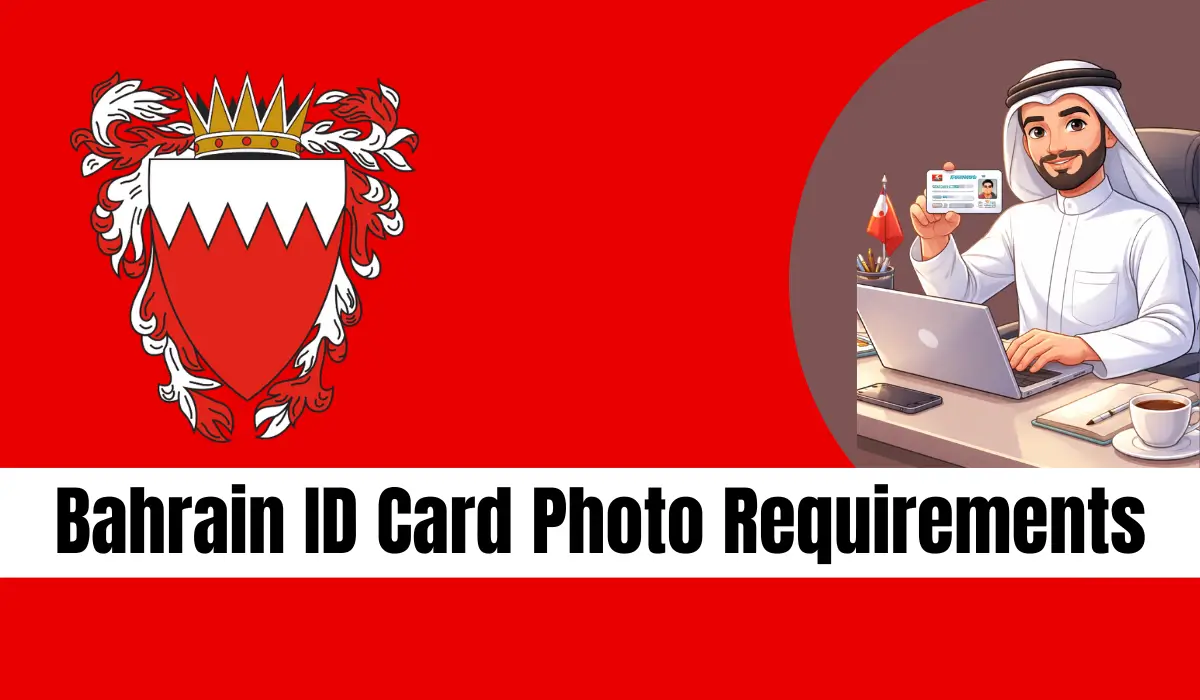
Bahrain ID Card Photo Requirements. Getting your Bahrain ID Card (CPR) approved starts with one very important step: the correct ID card photo. Many applications are delayed or rejected only because the photo does not meet official rules. That is why I have created this complete, easy, and Google-friendly guide covering everything about the Bahrain ID Card Photo.
This guide explains bahrain id card photo size, Bahrain CPR photo background color, Bahrain CPR card details, ID Card Photo Requirements, and New ID Card Photo Requirements very simply.
What Is a Bahrain ID Card (CPR)?
The Bahrain ID Card, also called the CPR card, is an official identification document issued by the Kingdom of Bahrain. Every citizen and resident must have this card. It is used for:
- Government services
- Banking and finance
- Employment verification
- Healthcare access
- Online services via bahrain.bh
Your ID car d photo is a key part of this card, and strict rules apply.
Why Bahrain ID Card Photo Requirements Are Very Strict
Bahrain follows international biometric standards. The photo is used for:
- Facial recognition
- Security checks
- Digital identity verification
If the photo quality, size, background, or face position is wrong, your application will be rejected.
Bahrain ID Card Photo Size
Before going into details, let’s look at a quick summary.
| Feature | Requirement |
|---|---|
| Aspect Ratio | 3:4 |
| Face Coverage | 70% – 80% |
| Background Color | White / Grey (RGB 168,168,168) |
| Recency | Not older than 6 months |
| Expression | Neutral |
| File Format | JPG / JPEG |
| DPI | 300 |
| Max File Size | 2 MB – 3 MB |
Bahrain ID Card Photo Background Color (Rules)
Old Rule
- Plain white background only
New ID Card Photo Requirements
- Grey background with exact RGB values:
- RGB: 168, 168, 168
Background must be:
- Plain
- Shadow-free
- No patterns or objects
Bahrain ID Card Photo Size (Requirements Digital Photo)
Below are the official digital photo specifications:
- The photo must be in color with a plain white background.
- Image resolution must be 300 DPI for clear quality.
- The required photo size is 32.5mm × 43mm, following a 3:4 aspect ratio.
- The file size of the image should not be more than 2 MB.
- The minimum image resolution must be 1244 × 933 pixels.
- Accepted photo formats are JPEG or JPG only.
Face & Position Rules
- A small portion of the shoulders must be visible.
- There must be empty space above the head.
- The face should be placed exactly in the center of the photo.
- The face must cover 70% to 80% of the total image height.
- The distance from the top of the photo to the head should be:
- Minimum: 3mm
- Maximum: 4mm
Printed Bahrain ID Card Photo Requirements
If a printed photo is required, follow these rules strictly:
- The printed photo must be colored with a white background.
- The standard photo frame size should be 4 × 6 cm.
- The photo must be clean and smooth, with no folds or tears.
- There should be no marks or writing on either side of the photo.
- The photo surface must be matte, not shiny or glossy.
General Photo Standards
If a General Photo Standards is required, follow these rules strictly:
- The photo must be recent, taken within the last 6 months.
- Background must be plain white, without shadows or objects.
- The image must not be edited or altered using any photo editing software.
- The full head and the top part of the shoulders must be visible.
- The face should be centered and take up 70%–80% of the photo.
- Space above the head must remain between 3mm and 4mm.
- The photo should have balanced lighting, not too bright or too dark.
- The applicant must face straight toward the camera.
- Both sides of the face must be clearly visible.
- Red-eye effect and flash glare must be avoided.
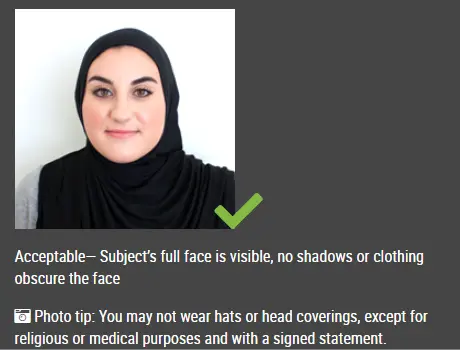
- The face must be fully visible, with no object covering it.
- Eyes must be open and clearly seen.
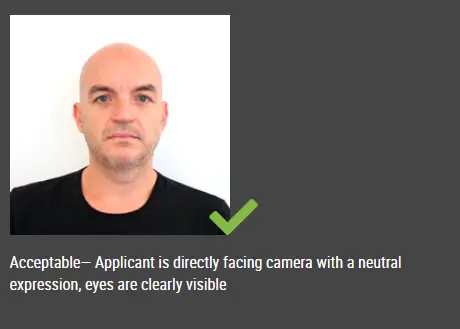
- A neutral facial expression is required (no smile, mouth closed).
Photo Quality & Exposure Rules
Your Bahrain ID card photo must:
- Be clear and sharp
- Not be over-exposed or under-exposed
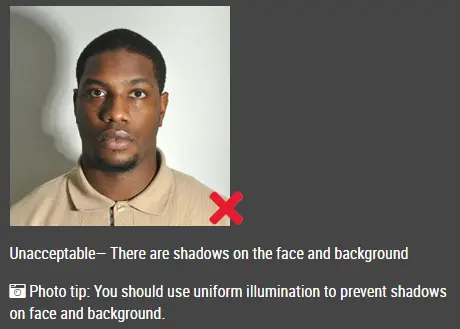
- Have no shadows on face or background
- Avoid red-eye and flash reflection
Face Position & Expression Rules
These are mandatory:
- Look directly at the camera
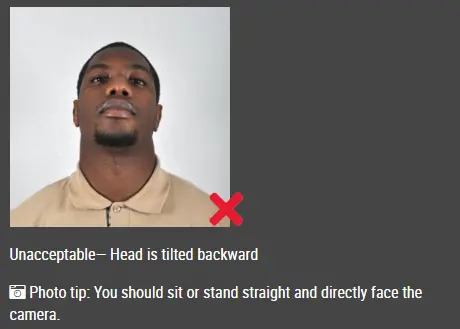
- Head straight (no tilt or rotation)
- Neutral facial expression
- Mouth closed
- Eyes open and clearly visible
- Both edges of the face visible
Smiling, frowning, or open mouth is not accepted.
Hair, Face & Visibility Rules
- Hair must not cover the face or eyes
- Forehead should be visible
- Full face must be clear
Head Coverings (Veil & Ghutra)
Head coverings are allowed only for religious reasons.
Rules:
- Religious head coverings such as veil or ghutra are allowed.
- The applicant’s full face must remain visible.
- The head covering must not create shadows on the face.
Glasses Rules for Bahrain ID Card Photo
- Eyes must be clearly visible through the glasses.
- No reflections or glare should appear on the lenses.
- Glass frames must not cover the eyes.
- Thick frames should be avoided if possible.
- Tinted glasses or colored contact lenses that hide natural eye color are not accepted.
Children & Infant Photo Rules
Special rules apply:
- Children must be photographed alone, with no other person visible.
- Children under 5 years are not required to look directly at the camera.
- Children under 1 year may have their eyes closed.
- If a child’s head is supported, the supporting hand must not be visible in the photo.
ID Card Photo Requirements PDF
New ID Card Photo Requirements (Latest)
Follow some of these Requirements of New ID Card Photo:
Photo Standards
- The photo must have a grey background with RGB (168, 168, 168).
- The photo must be taken within the last 6 months.
- The photo should show a close-up of the head and top of the shoulders.
- The face must cover 70% to 80% of the photo.
- Hair must not cover the face.
- Eyes must be open and clearly visible.
- The photo must not be overexposed or underexposed.
- The applicant must face forward and look directly at the camera.
- Both sides of the face must be visible.
- Red-eye and flash reflections must be avoided.
Photo Size & Resolution
- Minimum photo size must be 240 × 320 pixels.
- Smaller sizes will be rejected (example: 235 × 320 pixels is not valid).
- The photo must follow a 3:4 aspect ratio (width × height).
- Resolution must be 300 DPI.
- The photo must not be edited or enhanced using Photoshop or any software.
- Image file size must not exceed 3 MB.
Head Coverings
- Veil or Ghutra is allowed for religious reasons only.
- The full face must be clearly visible.
- The head covering must not create shadows on the face.
Glasses Rules
- Eyes must be clearly visible.
- No reflections on the glasses.
- Glass frames must not cover any part of the eyes.
- Thick frames should be avoided.
- Tinted glasses or colored contact lenses are not allowed.
Child Photo Rules
- Children must be alone in the photo.
- Children under 5 years do not need to look directly at the camera.
- Children under 1 year may have eyes closed.
- If the head is supported by a hand, the hand must not appear in the photo.
New ID Card Photo Requirements PDF
Common Reasons Bahrain ID Card Photo Gets Rejected
- Wrong background color
- Face size incorrect
- Shadows on face
- Low resolution
- Edited or filtered photo
- Wrong pixels or DPI
- Glasses reflection
How to Take Bahrain ID Card Photo at Home
Follow some of these steps:
Step 1: Use a Camera or Smartphone
Ask someone to take your photo. Selfie is not allowed. If possible, use a tripod so the camera stays steady and straight.
Step 2: Choose a Plain Background and Good Lighting
Use a plain background, mostly white (as required by most countries). Make sure no objects appear behind you. Face a window or natural light to avoid shadows on the face or background.
Step 3: Wear Proper Clothes
Wear normal daily clothes. Do not wear uniforms. Remove glasses, sunglasses, or tinted glasses. Make sure your full face is visible. Hair should not cover eyes or eyebrows. Hats are not allowed, except religious head coverings.
Step 4: Pose Correctly
Look straight at the camera. Keep your head straight, not tilted. Both ears or both sides of the face should be visible. Shoulders must appear, and leave some space around the head. Keep the camera at eye level.
Step 5: Keep a Neutral Expression
Maintain a neutral face with mouth closed. Smiling or opening the mouth is usually not accepted, especially under new passport rules.
Online Bahrain ID Card Photo Tools
You can take a photo with any background and convert it online. These tools:
- Resize to correct pixels
- Adjust background color
- Match official Bahrain requirements
Your photo will be ready in seconds and accepted on bahrain.bh.
Can You Apply Online with This Photo?
Yes. Bahrain allows:
- Digital photo upload
- Online submission via MyGov app or bahrain.bh
Benefits of Using Correct Bahrain ID Card Photo
- Faster application approval: A correct photo helps your ID card get approved without delay.
- No rejection issues: Following official rules minimizes photo rejection risk.
- Smooth online submission: Correct photo size and format uploaded easily on bahrain.bh portal.
- Professional identity record: A clear photo creates a strong and accurate official record.
- Save time and money: You avoid repeated photo sessions and re-application fees.
- Accepted for all services: One compliant photo can be used for banking, visas, and government services.
- Long-term usability: A high-quality photo stays valid for the entire ID card period.
- Better biometric matching: Clear facial features improve biometric verification accuracy.
Tips for Bahrain ID Card Photo
- Always use a recent photo: Make sure your photo was taken within 6 months to avoid rejection.
- Choose the correct background color: Use a plain white or grey (RGB 168,168,168) background only. Busy backgrounds are unacceptable.
- Maintain proper lighting: Stand facing natural light to avoid shadows, dark spots, or overexposure to the face.
- Keep your face centered: Your face should be exactly in the center and cover 70%–80% of the photo.
- Avoid photo editing apps: Do not use Photoshop or beauty filters. Edited photos are strictly rejected.
- Remove glasses if possible: Glasses often reflect. Removing them reduces the rejection risk.
- Wear simple daily clothes: Avoid uniforms, heavy patterns, or bright colors. Simple clothes look professional.
FAQs
What is the Bahrain ID card photo size?
Digital: 240×320 pixels or 933×1244 pixels, 300 DPI.
What is the Bahrain CPR photo background color?
New rule: Grey (RGB 168,168,168). Old rule: white.
Can I smile in Bahrain ID card photo?
No. Neutral expression only.
Are glasses allowed?
Yes, but without reflection. Tinted glasses are not allowed.
Conclusion
A correct Bahrain ID Card Photo saves time, money, and stress. Follow the latest official requirements, keep your photo clear, and avoid editing. Whether digital or printed, accuracy is the key to approval.